
SEO and Organic Search
How to Plan a Website Migration Without Losing Your SEO
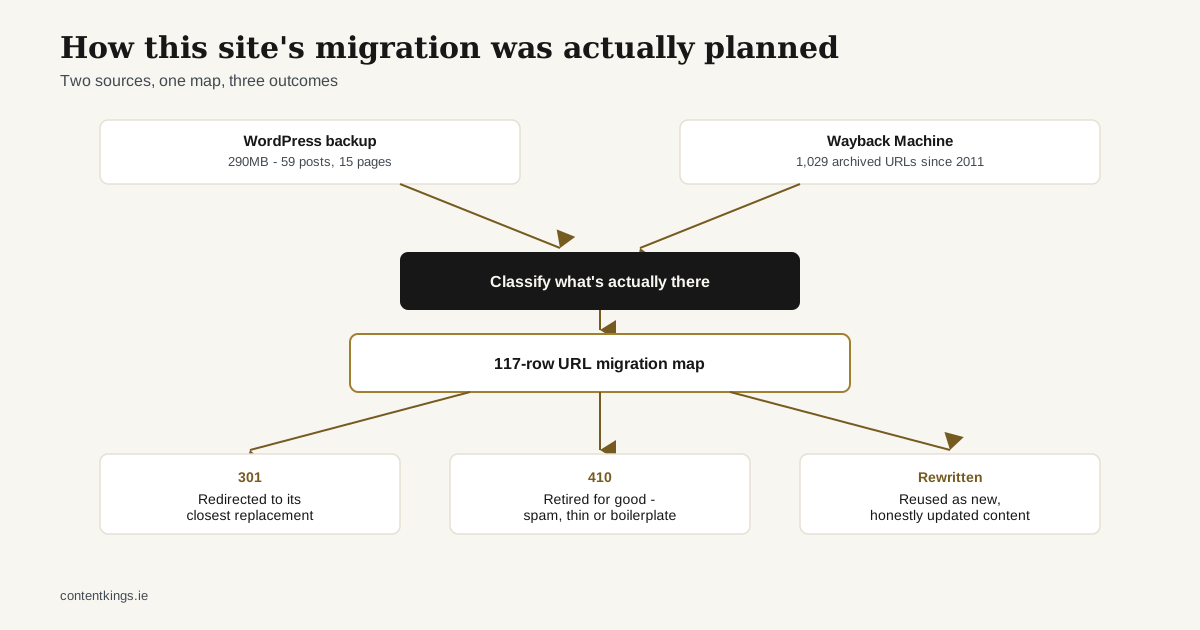
Most migration guides are written in the abstract: “audit your content, map your redirects, monitor rankings after launch.” True, but not very useful until you’ve actually done it once with a messy, years-old site. So instead of the generic version, here’s what we actually did migrating this website - contentkings.ie itself - off an old, parked WordPress install.
Start with what’s actually there, not what you assume is there
The old site had been offline for a while, so the starting point was two things: a WordPress backup (the All-in-One WP Migration format - a stream of file headers and raw bytes, not a standard zip, so it needs purpose-built tooling to read) and the Wayback Machine’s archive of the live site going back to 2011.
We pulled both. The WordPress database gave us the most recent published state - 15 pages, 59 blog posts. The Wayback Machine’s CDX API gave us the full history - 1,029 archived URLs stretching back over a decade, including content that had already been deleted from the live database years before the final backup was taken. Relying on only one source would have missed real content; the database alone had no trace of the site’s 2010-2012 era at all.
One practical note: always run a control query before trusting a negative result from the Wayback CDX API. A query that returns zero snapshots for every URL you check is just as likely to mean the query itself is malformed as it is to mean nothing was archived. Check a known-archived domain first.
Classify before you decide
With the full inventory in hand, the next step wasn’t deciding redirects - it was classifying what we’d actually found, because not everything that existed deserves a decision beyond “no”:
- Real, reusable content. An About page with genuine company history, four service pages with real (if dated) descriptions of the business.
- Generic, templated content. 59 blog posts, all dated 2021-2022, all in the “10 Tools To X” / “5 Ways To Y” pattern typical of outsourced content-mill writing. No first-hand experience behind any of them, no reason to revive them as-is.
- Theme boilerplate. Default WordPress/theme demo pages -
/sample-page/,/hello-world/- that were never real content to begin with. - Evidence of a past compromise. Six pharmaceutical spam URLs, all captured once, on the same day, in February 2015 - the unmistakable signature of a hacked WordPress install. These get a 410 (Gone) and nothing else, permanently.
That classification is what actually drives the redirect decisions - not a blanket “redirect everything to the homepage,” which search engines increasingly treat as a weak signal anyway, and not a blanket “404 everything that’s old,” which throws away real content and real backlink equity.
Build the actual map before you touch anything live
Every URL got one row in a migration spreadsheet: old URL, proposed new URL, redirect decision (301, 410, or consolidate into another page), content decision, and the evidence for that decision. For this site that was 117 rows. It sounds tedious because it is, but it’s also the only way to avoid the two most common migration mistakes: redirecting thin or spammy content into your new site (which can drag its reputation down with it), and silently losing a page that was actually earning traffic or links.
What we didn’t do
We didn’t revive the 59 templated blog posts just because they existed. We didn’t guess at redirect destinations - every mapped URL has a reason attached to it. And we didn’t touch the live DNS or take anything down before the replacement was ready; the research and the build happened entirely in parallel with the old (now parked) site left alone.
The part that’s still ahead
A migration plan is not the same as a finished migration - the proof is in what happens after launch: whether the redirects actually resolve correctly, whether Search Console shows the old URLs dropping out cleanly, whether anything genuinely valuable got missed. That monitoring phase is still ahead of us for this site, and it’s the phase most migration guides skip over because it’s less tidy than the planning phase. We’ll write about it honestly once it’s actually happened.